Start here
Zombies Aren't Real: Your First Mission
How a Zombies Aren't Real mission is put together: you get a planning phase, a survival target, a budget, and then the outbreak starts. Here is what to do with each of those.
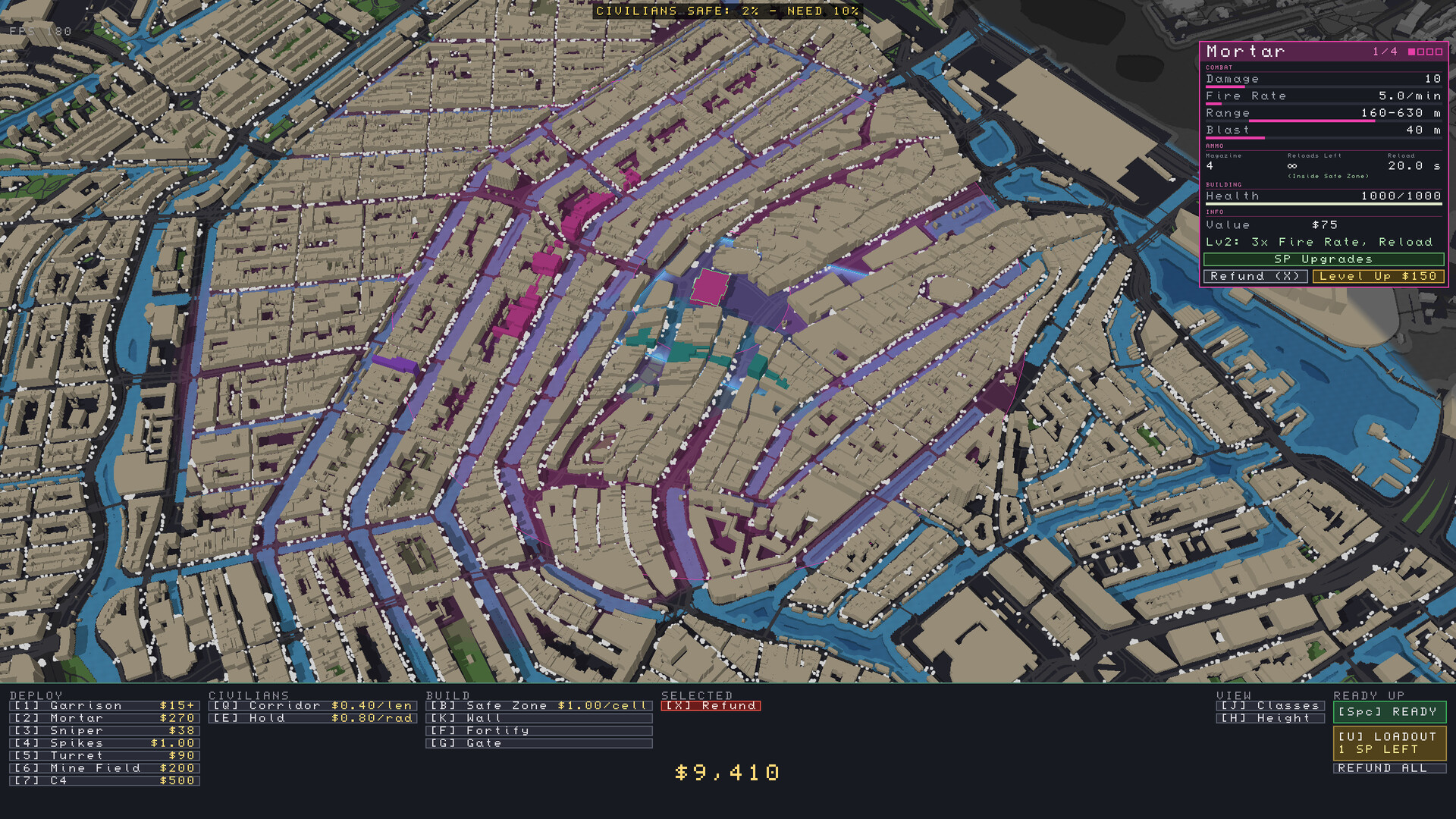
The shape of a mission
A Zombies Aren't Real mission has two distinct halves, and they need different thinking.
The planning phase. You look down on a real city and nothing is attacking yet. You have a budget, a map full of civilian dots, a list of things you can deploy and build, and a target at the top of the screen. In one early scenario that target reads "Civilians safe: 2% - need 10%" - the percentage you must keep alive by the end of the battle. Different scenarios ask for different percentages, so read that bar before you spend anything.
The battle. You press ready and the outbreak begins. Zombies appear, fan out through the streets and start infecting the population. From here you fight in real time: you can speed the simulation up, pause it, spend your remaining money mid-battle, and call in the battle abilities your loadout carries.
What to do in the planning phase
The planning menu has four groups, and they map to four questions.
1. Build the safe zone. Safe zones are drawn per cell and cost money for every cell you enclose. The screen in the store screenshots prices it at $1.00 per cell, in a scenario where the budget sits around $9,410. A safe zone is only useful if two things are true: enough civilians can reach or stay inside it, and you can actually defend its boundary. A sprawling perimeter with nothing on the walls is the most common way to lose a first mission.
2. Give people a way in. A gate is the opening that lets civilians outside your safe zone reach safety once the outbreak starts. A tight safe zone plus a few gates beats a huge safe zone with none, because your starting coverage does not have to equal your final survival percentage - people who enter through a gate count too.
3. Put soldiers where they can shoot. Garrisons, snipers, turrets and mortars all cost money, and each one covers a different problem. The units page goes through them in order. What matters at this stage is the rule underneath all of them: a unit that cannot see the wall it is supposed to defend is a unit you paid for and did not use.
4. Set your loadout and ready up. Before you start, you pick the battle abilities you will carry into the fight - the loadout screen shows how many skill points you have left - and then press ready. Once the battle starts, you cannot rebuild your safe zone from scratch; the abilities you brought are what you have.
What the battle looks like
During the battle the screen gives you the tools to react:
- Speed and pause. The speed controls step from 1x up to 8x, and the pause key freezes the map so you can look around. Speeding up is normal - the early minutes of an outbreak are mostly watching the spread develop.
- Battle abilities. The bottom bar holds the abilities you loaded: paratroopers, strikes, missiles, gas, helicopter support and APCs appear across the official screenshots. Which ones you have depends on the scenario and what you unlocked, which is exactly why the loadout screen exists.
- The stats panel. It tracks how many civilians are left, how many zombies are alive, and how many kills each unit type has scored. That last number is the honest scorecard of your plan: if your garrisons have 9 kills and your helicopters have 492, you now know where your money went.
What winning looks like
You win by eliminating every zombie. Your score is how many civilians you saved.
That order matters. A run that kills every zombie but loses the district is a win on paper; the game still grades you on the people. The strongest runs tend to share three habits: a safe zone that is no bigger than the defenders on its walls, gates placed where fleeing civilians actually are, and air support held back until the moment the perimeter is about to break instead of spent on the first cluster.
The developer is explicit about what kind of game this is: Zombies Aren't Real is highly strategic, it is not an incremental game, and losing is part of the design. Restarting a scenario once defeat is inevitable, so you can change the plan, is the intended loop rather than a punishment.
If you came here from the front page
- Units and defense - what each deploy option does, with the prices shown in the planning UI.
- Maps and Workshop - real-world city maps, the level editor, and the community maps already published.
- PC requirements - what hardware the game asks for, and the Low settings tip.